“A returning customer calls and nobody remembers what equipment you installed or what you charged last spring.”
✓ With Service Zen
Open the client record to see every past request, quote, completed job, invoice and message on a single timeline.
Generic sales CRMs are built for corporate deal pipelines, not service vans and repeat property visits. Service Zen gives trade and service businesses a practical client hub that connects leads, addresses, custom fields, quotes, jobs and invoices.
Know who called, what you fixed last year and what needs follow-up today. Built for four-season trade & service teams
“A returning customer calls and nobody remembers what equipment you installed or what you charged last spring.”
Open the client record to see every past request, quote, completed job, invoice and message on a single timeline.
“Important site details—gate codes, dog names, shutoff valve locations—only exist in one technician’s text history.”
Store property notes and custom fields per client or job type so any assigned technician has the full picture.
“Website inquiries, phone leads and referrals slip away when your week gets busy.”
Capture every lead into one pipeline with clear status tracking from new inquiry to quoted, booked and completed.
When you are on a ladder, in a crawlspace or with a customer, callers rarely leave a detailed voicemail. Estimate what capturing those inquiries is worth.
Your team still reviews every captured work request, confirms availability and approves pricing before booking.
Booking a second or third job with an existing customer costs a fraction of acquiring a cold lead from paid search ads.
Having equipment serials, gate codes, shutoff locations and past invoices on one screen turns every incoming call into an informed conversation.
A simple 3-day follow-up on sent estimates in your CRM pipeline routinely recovers 1 in 5 stalled quotes.
Linking billing contacts and on-site property/tenant contacts prevents invoice confusion and locked-gate delays.
Set up custom fields like these once so every technician and office admin looks like they know the property by heart.
Team Access Tip: Use role-based permissions in Service Zen so field crews see property and job context while financial settings stay with the owner/admin.
Log new inquiries from web forms, calls or the AI receptionist straight into a structured client profile with service address and issue details.
Add custom fields for equipment serial numbers, lot size, filter dimensions, paint codes or access instructions so details never get lost.
Every estimate sent, visit scheduled, SMS update and invoice generated links back to the same client hub automatically.
Review client history before seasonal outreach or return visits so every follow-up feels personal, informed and timely.
An HVAC company tracks condenser models; a landscaper tracks irrigation zones; a cleaner tracks keybox codes. Service Zen lets you define custom fields for clients and jobs without cluttering the screen.
Keep client conversations beside the job record instead of buried on personal phones. Review message threads, send appointment updates and see who replied.
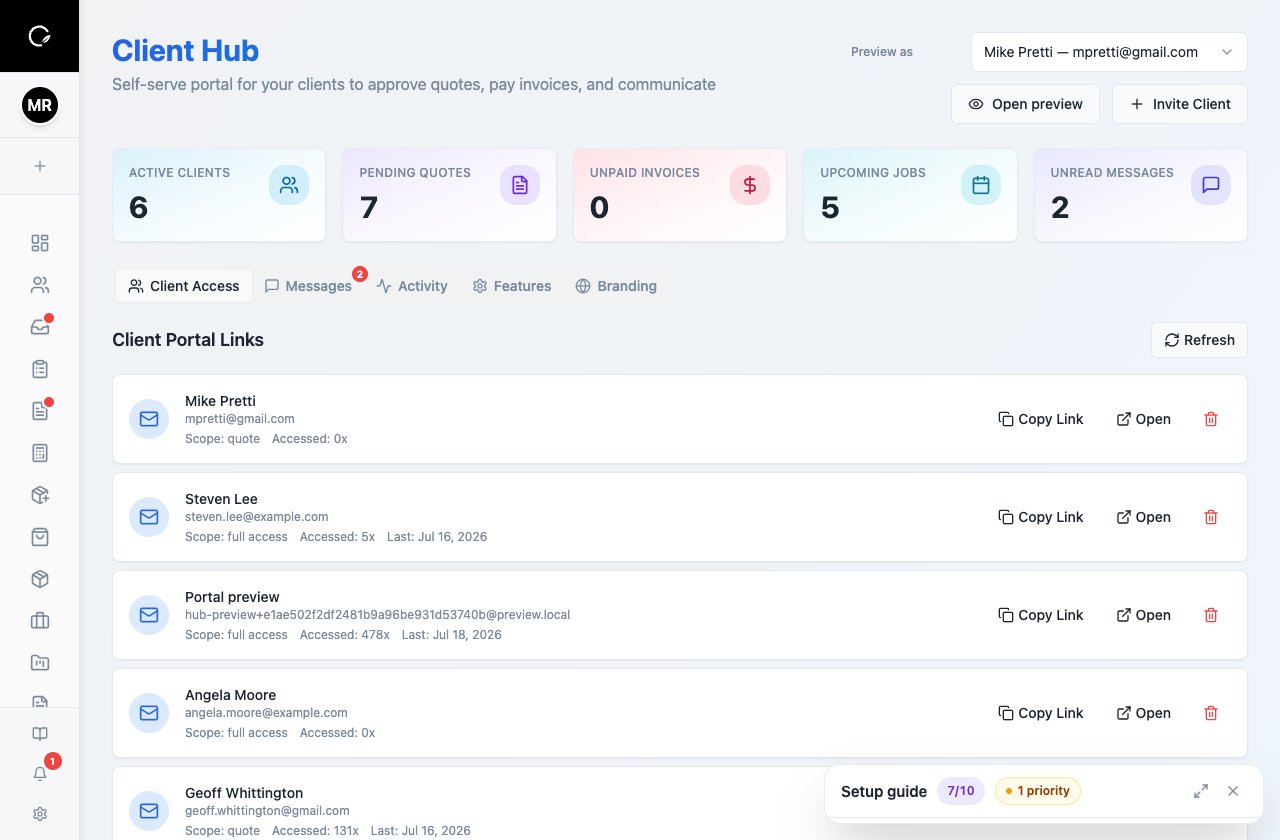
Give customers a clean, professional place to submit work requests, review quotes, check upcoming appointments and pay invoices online.
Generic CRMs stop when a deal is marked won. Service Zen connects the client record directly to field scheduling, technician dispatch, job checklists, invoicing and online payments.
Yes. You can create custom fields (text, numbers, dates, dropdowns and checkboxes) for clients and jobs to capture trade-specific property or equipment data.
Yes. Service Zen includes data import tools so you can bring existing client contacts and records into your workspace.
Explore the live demo, test a workflow, or compare our current plans.